Daftar Isi
Tidak masalah protokol yang Anda gunakan untuk mengakses repositori Anda, Anda selalu perlu untuk membuat setidaknya satu repositori. Ini bisa dikerjakan dengan klien baris perintah Subversion atau dengan TortoiseSVN.
Jika Anda belum membuat repositori Subversion, inilah waktu untuk membuatnya sekarang.
Buat folder kosong dengan nama SVN (contoh
D:\SVN\), yang akan digunakan sebagai akar dari semua repositori Anda.Buat folder lain
MyNewRepositorydi dalamD:\SVN\.Open the command prompt (or DOS-Box), change into
D:\SVN\and typesvnadmin create --fs-type fsfs MyNewRepository
Sekarang Anda sudah mendapatkan repositori baru ditempatkan di D:\SVN\MyNewRepository.
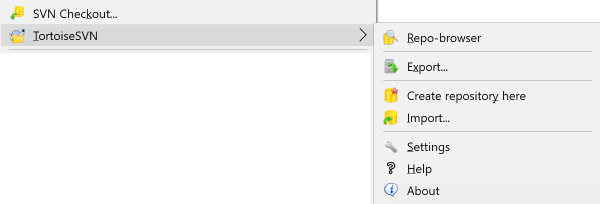
Buka windows explorer
Buat folder baru dan beri nama, misalnya
SVNRepositoryRight click on the newly created folder and select → .
Repositori kemudian dibuat di dalam folder baru. Jangan edit file itu oleh Anda sendiri!!!. Jika Anda mendapatkan kesalahan pastikan bahwa folder kosong dan tidak dilindung tulis.
You will also be asked whether you want to create a directory structure within the repository. Find out about layout options in bagian bernama “Tata Letak Repositori”.
TortoiseSVN will set a custom folder icon when it creates a repository so you can identify local repositories more easily. If you create a repository using the official command line client this folder icon is not assigned.
Tip
We also recommend that you don't use file:// access at all, apart from local testing purposes. Using a server is more secure and more reliable for all but single-developer use.
Untuk mengakses repositori lokal Anda memerlukan path ke folder itu. Ingatlah bahwa Subversion mengharapkan semua path repositori dalam bentuk file:///C:/SVNRepository/. Perlu dicatat penggunaan dari garis miring maju.
Untuk mengakses repositori yang ditempatkan pada jaringan berbagi Anda bisa menggunakan pemetaan drive, atau Anda bisa menggunakan path UNC. Untuk path UNC, bentuknya adalah file://ServerName/path/to/repos/. Catatan bahwa hanya ada 2 garis miring didepannya disini.
Sebelum SVN 1.2, path UNC harus diberikan dalam bentuk lebih kabur file:///\ServerName/path/to/repos. Bentuk ini masih didukung, tapi tidak direkomendasikan.
Although in theory it is possible to put a FSFS repository on a network share and have multiple users access it using file:// protocol, this is most definitely not recommended. In fact we would strongly discourage it, and do not support such use for various reasons:
Firstly you are giving every user direct write access to the repository, so any user could accidentally delete the entire repository or make it unusable in some other way.
Secondly not all network file sharing protocols support the locking that Subversion requires, so you may find your repository gets corrupted. It may not happen straight away, but one day two users will try to access the repository at the same time.
Thirdly the file permissions have to be set just so. You may just about get away with it on a native Windows share, but SAMBA is particularly difficult.
If one person installs a newer version of the client which upgrades the repository format, then everyone else will be unable to access the repository until they also upgrade to the new client version.
file:// access is intended for local, single-user access only, particularly testing and debugging. When you want to share the repository you really need to set up a proper server, and it is not nearly as difficult as you might think. Read bagian bernama “Akses ke Repositori” for guidelines on choosing and setting up a server.
Sebelum Anda mengimpor data Anda ke dalam repositori, pertama Anda harus memikirkan tentang bagaimana Anda ingin mengatur data Anda. Jika Anda menggunakan salah satu tata letak yang direkomendasikan nantinya akan lebih mudah.
There are some standard, recommended ways to organize a repository. Most people create a trunk directory to hold the “main line” of development, a branches directory to contain branch copies, and a tags directory to contain tag copies. If a repository holds only one project, then often people create these top-level directories:
/trunk
/branches
/tags
Because this layout is so commonly used, when you create a new repository using TortoiseSVN, it will also offer to create the directory structure for you.
Jika repositori berisi multipel proyek, orang sering mengindeks tata letaknya dengan cabang:
/trunk/paint
/trunk/calc
/branches/paint
/branches/calc
/tags/paint
/tags/calc
...atau dengan proyek:
/paint/trunk
/paint/branches
/paint/tags
/calc/trunk
/calc/branches
/calc/tags
Mengindeks dengan proyek masuk akal jika proyek tidak terkait erat dengan salah satu yang di-check out secara individu. Untuk proyek terkait dimana Anda mungkin ingin melakukan check out semua proyek dalam sekali jalan, atau dimana proyek adalah terkait semua dalam satu paket distribusi, sering lebih baik untuk diindeks dengan cabang. Dengan cara ini Anda hanya mempunyai satu trunk untuk di-checkout, dan hubungan antara sub-proyek nampak lebih mudah.
Jika Anda mengadopsi pendekatan tingkat atas /trunk /tags /branches, Anda harus mengcopy seluruh trunk untuk setiap cabang dan tag, dan dalam beberapa cara struktur ini menawarkan fleksibilitas terbanyak.
Untuk proyek tidak terkait Anda mungkin lebih ingin menggunakan repositori terpisah. Ketika Anda mengkomit perubahan, angka revisi dari seluruh repositori yang berubah, bukan angka revisi proyek. Mempunyai 2 proyek tidak terkait berbagi repositori bisa membuat ruang besar dalam angka revisi. Proyek Subversion dan TortoiseSVN nampak di alamat host yang sama, tapi sebenarnya memisahkan sepenuhnya repositori yang membolehkan pengembangan independen, dan tidak ada kebingungan pada angka pembuatan.
Tentu saja, Anda bebas untuk mengabaikan tata letak umum ini. Anda bisa membuat variasi apapun, apa saja yang bekerja terbaik bagi Anda atau tim Anda. Ingat bahwa apapun pilihan Anda, itu bukan komitmen permanen. Anda bisa mengatur ulang repositori Anda kapan saja. Karena cabang dan tag sebenarnya direktori, TortoiseSVN bisa memindahkan atau mengganti namanya sesuai yang Anda inginkan.
Menukar dari satu tata letak ke lainnya hanyalah masalah menerbitkan seri perpindahan dari sisi-server; Jika Anda tidak menyukai cara kerja yang diatur dalam repositori, aturlah kembali direktori.
So if you haven't already created a basic folder structure inside your repository you should do that now. There are two ways to achieve this. If you simply want to create a /trunk /tags /branches structure, you can use the repository browser to create the three folders (in three separate commits). If you want to create a deeper hierarchy then it is simpler to create a folder structure on disk first and import it in a single commit, like this:
buat folder kosong baru pada hard disk Anda
buat struktur folder tingkat-atas yang Anda inginkan, di dalam folder itu - jangan simpan dulu file apapun!
import this structure into the repository via a right click on the folder that contains this folder structure and selecting → In the import dialog enter the URL to your repository and click OK. This will import your temp folder into the repository root to create the basic repository layout.
Note that the name of the folder you are importing does not appear in the repository, only its contents. For example, create the following folder structure:
C:\Temp\New\trunk
C:\Temp\New\branches
C:\Temp\New\tags
Import C:\Temp\New into the repository root, which will then look like this:
/trunk
/branches
/tags